Download Markdown Viewer for iPhone
Download Md Preview on the App Store to open .md, .markdown, .mdx, .rmd, and .qmd files locally on iPhone and iPad.
 Md Preview
Markdown viewer for iPhone and iPad
The app does not open ZIP archives. Extract the archive in Files, then choose one supported Markdown file. Open one .md, .markdown, .mdx, .rmd, .qmd file from Files, the iOS Share Sheet, or Open In.
Use Md Preview from Files, the iOS Share Sheet, or Open In to preview .md, .markdown, .mdx, .rmd, .qmd locally on iPhone and iPad without uploading. The app does not open ZIP archives. Extract the archive in Files, then choose one supported Markdown file.
App Store opens directly on iPhone and iPad.
Official App Store screenshots show the exact job: open local files from AI, Files, cloud drives, and email on iPhone and iPad.
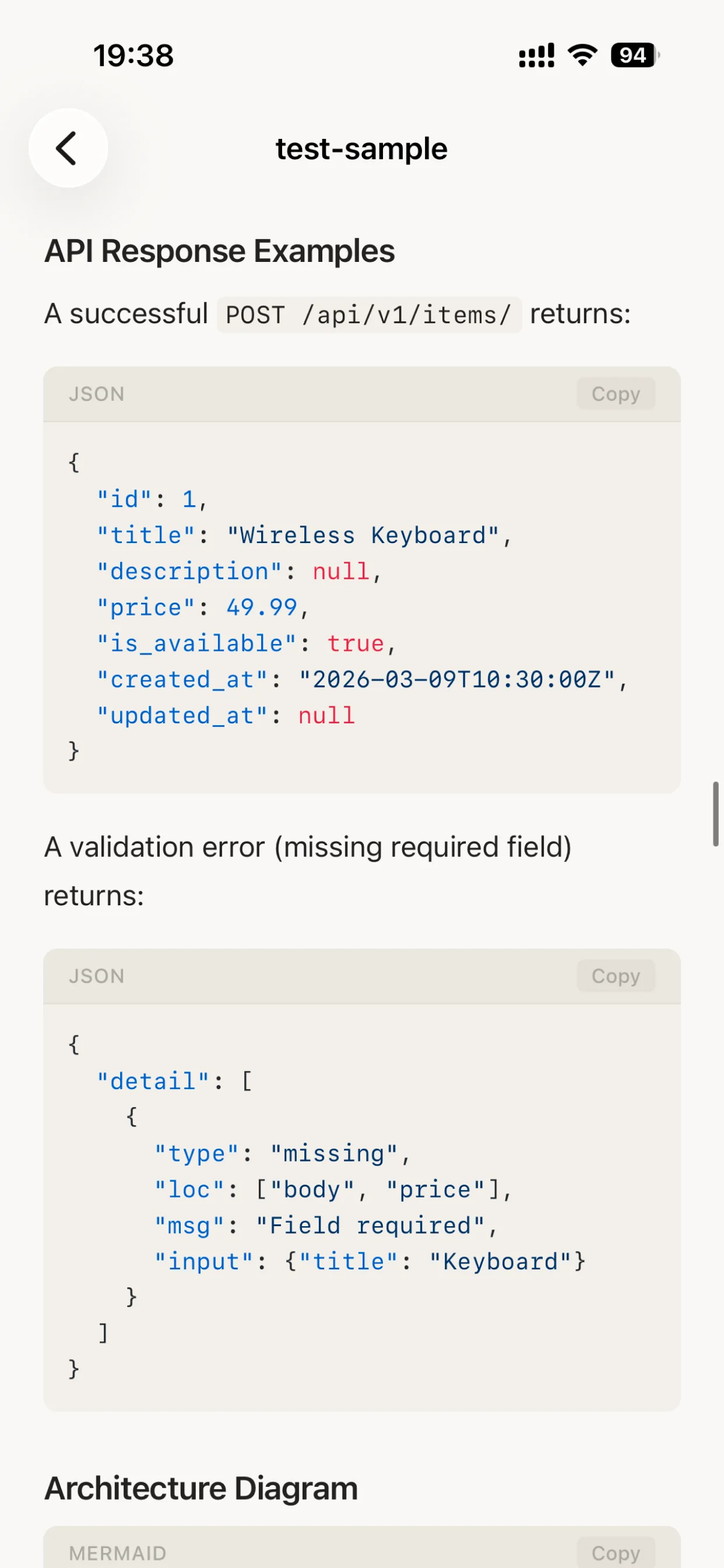


Compare, open, read, or download Markdown on iPhone with the guides closest to an App Store action.
Download Md Preview on the App Store to open .md, .markdown, .mdx, .rmd, and .qmd files locally on iPhone and iPad.
Need an app to open MD files on iPhone? Use Md Preview for local .md and Markdown files from Files and Share Sheet.
Open .md, .markdown, .mdx, .rmd, and .qmd files on iPhone with a focused local Markdown file opener.
Read local Markdown files on iPhone or iPad. Md Preview renders .md, .markdown, .mdx, .rmd, and .qmd documents.
Compare iOS MD viewer options for iPhone and iPad: open .md and Markdown files locally from Files, AI tools, and downloads.
Use an offline Markdown viewer for iPhone and iPad. Open .md files locally with no uploads, subscriptions, in-app purchases, or ads.
Pick the closest guide for README, CHANGELOG, image folders, ZIP exports, MDX, R Markdown, Quarto. Md Preview opens the Markdown file locally on iPhone or iPad.
Open README.md files on iPhone or iPad. Preview project docs, setup steps, links, code blocks, images, and tables locally.
Open CHANGELOG.md files on iPhone or iPad. Preview release notes, version lists, links, code blocks, and tables locally.
Markdown with images: preview one supported Markdown file locally on iPhone with Md Preview; linked local files are not guaranteed.
Markdown ZIP export: extract in Files first, then preview one supported Markdown file locally on iPhone with Md Preview; linked project files are not guaranteed.
Open GitHub README.md files on iPhone or iPad with a Markdown viewer that renders headings, code blocks, links, and tables.
Open .mdx files on iPhone and iPad with a focused Markdown viewer for docs, AI files, technical notes, and component content.
Open .rmd and .qmd files on iPad or iPhone with local Markdown preview for reports, notes, and technical documents.
Open R Markdown .rmd files on iPhone or iPad with local preview for reports, code, tables, notes, and technical documents.
Open Quarto .qmd files on iPhone or iPad with local Markdown preview for reports, notebooks, code, tables, and notes.
Open the matching HTML topic hub on Html Preview instead of starting from the homepage.
Extract ZIPs in Files, then preview one supported HTML file with Html Preview. ZIP archives and multi-file projects do not open inside the app.
Use Md Preview from Files, the iOS Share Sheet, or Open In to preview .md, .markdown, .mdx, .rmd, .qmd locally on iPhone and iPad without uploading. The app does not open ZIP archives. Extract the archive in Files, then choose one supported Markdown file. When ChatGPT, Claude, Gemini, Perplexity, Copilot, DeepSeek, Grok, NotebookLM, Obsidian, Notion, GitHub, Mail, iCloud Drive, Google Drive, or Dropbox gives you a Markdown file, open it in Md Preview for a clean rendered view. No subscriptions. No in-app purchases. No ads.
Use this route when the file already exists and you need a reliable preview path on iPhone or iPad.
You have a Markdown file from README.md, CHANGELOG.md, MDX, R Markdown, Quarto, images, or ZIP exports and iOS shows an icon, raw code, or an unreadable preview.
Start from Files, Mail, Safari downloads, AirDrop, a cloud drive, or the source app, then use Share or Open In.
Md Preview is the dedicated local viewer for .md, .markdown, .mdx, .rmd, .qmd; it avoids upload and converter workflows.
If raw text is enough, Files can show many .md files. Use Md Preview when you need rendered Markdown, code, math, tables, or Mermaid on iPhone or iPad.
Use Html Preview, the companion iOS viewer for HTML files, when this workflow produces HTML instead of Markdown.
Open the App Store listing, install the viewer, then return to the file and share it to Md Preview.
Use this as a quick match for the file type, source app, device, and question you have.
Quick answer
A short source-backed answer that search engines and assistants can quote before sending users to the App Store.
Short, direct answers for the iPhone and iPad file-opening questions people search before downloading.
Use Md Preview from Files, the iOS Share Sheet, or Open In to preview .md, .markdown, .mdx, .rmd, .qmd locally on iPhone and iPad without uploading. The app does not open ZIP archives. Extract the archive in Files, then choose one supported Markdown file.
iOS can display many text files, but it does not provide a complete native Markdown preview with GFM, code highlighting, math, tables, and diagrams. Md Preview gives Markdown files a dedicated rendered preview.
Yes. Rendering happens on your iPhone or iPad.
Md Preview is a focused viewer for one supported file at a time.
Open one .md, .markdown, .mdx, .rmd, .qmd file from Files, the iOS Share Sheet, or Open In.
The app does not open ZIP archives. Extract the archive in Files, then choose one supported Markdown file.
For reliable preview, use self-contained Markdown. Relative local images, linked documents, anchors, or neighboring project files may not resolve.
The app previews a file; it does not edit Markdown or manage a multi-file project.
Choose the file-opening route that matches where the file came from.
Open AI-generated Markdown files from ChatGPT, Claude, and Gemini locally on iPhone
Open ChatGPT, Claude, Gemini, and Perplexity Markdown files locally on iPhone
Open local Markdown files from Cursor, Codex, Claude Code, v0, and AI coding tools on iPhone
Open local Markdown files from Files, Mail, Safari downloads, and the iOS Share Sheet on iPhone
Open local cloud drive Markdown files from Google Drive, iCloud Drive, Dropbox, OneDrive, Box, and SharePoint on iPhone
Extract ZIPs in Files, then preview one supported Markdown file with Md Preview. ZIP archives and multi-file projects do not open inside the app.
Open local .md, .markdown, .mdx, .rmd, .qmd files on iPhone with a focused Markdown viewer. Md Preview previews files from Files, Mail, and AI tools
Open text/markdown locally on iPhone. Md Preview previews .md, .markdown, .mdx, .rmd, .qmd
Md Preview: private offline local Markdown preview on iPhone; files stay on device
Preview local Markdown files with code, math, Mermaid diagrams, and technical notes on iPad
Best Markdown viewer for iPhone: open local files from Files, ChatGPT, Mail, and downloads. Use Html Preview for HTML.
Download a focused Markdown viewer for iPhone and preview files locally
Use Md Preview as a local Markdown file opener for iPhone files from Files
Md Preview fixes .md locally when Files/Quick Look shows raw text on iPhone.
Open static site and docs framework Markdown files locally on iPhone
Open developer and code editor Markdown files from GitHub, VS Code, Working Copy, and terminal workflows locally on iPhone
Open email, chat, and team app Markdown attachments locally on iPhone
Open notes, docs, and knowledge-base Markdown exports locally on iPhone
Open downloaded Markdown files from Safari, Chrome, Edge, Firefox, and Brave locally on iPhone
Import, share, and open local Markdown files from Files, Share Sheet, Open In, AirDrop, and ZIP exports on iPhone
AI chatbots, GitHub projects, note apps, and documentation tools produce Markdown files every day. On iPhone and iPad those files are often hard to read without a dedicated viewer.
GFM tables, task lists, footnotes, links, and strikethrough.
Code highlighting, LaTeX math, and Mermaid diagrams.
No analytics, no uploads, and no tracking.
When ChatGPT, Claude, Gemini, Perplexity, Copilot, DeepSeek, Grok, NotebookLM, Obsidian, Notion, GitHub, Mail, iCloud Drive, Google Drive, or Dropbox gives you a Markdown file, open it in Md Preview for a clean rendered view.
Save or receive a .md, .markdown, .mdx, .rmd, or .qmd file.
Use the iOS Share Sheet, Files app, or file handler.
Markdown renders locally with a calm, readable layout.
iOS can display many text files, but it does not provide a complete native Markdown preview with GFM, code highlighting, math, tables, and diagrams. Md Preview gives Markdown files a dedicated rendered preview.
Yes. Rendering happens on your iPhone or iPad.
Yes. It is designed for Markdown files produced by ChatGPT, Claude, Gemini, Perplexity, Copilot, DeepSeek, Grok, NotebookLM, and similar AI tools.
No. Md Preview has no subscriptions, no in-app purchases, and no ads.
Use Md Preview from Files, the iOS Share Sheet, or Open In to preview .md, .markdown, .mdx, .rmd, .qmd locally on iPhone and iPad without uploading. The app does not open ZIP archives. Extract the archive in Files, then choose one supported Markdown file.
Open README.md files on iPhone or iPad. Preview project docs, setup steps, links, code blocks, images, and tables locally.
Open CHANGELOG.md files on iPhone or iPad. Preview release notes, version lists, links, code blocks, and tables locally.
Markdown with images: preview one supported Markdown file locally on iPhone with Md Preview; linked local files are not guaranteed.
Open Markdown front matter on iPhone with Md Preview. Render YAML metadata, headings, links, code, images, and tables locally. No upload.
Open Markdown tables on iPhone with Md Preview. Render wide tables, code, links, notes, and images locally. No upload.
Markdown ZIP export: extract in Files first, then preview one supported Markdown file locally on iPhone with Md Preview; linked project files are not guaranteed.
Open GitHub README.md files on iPhone or iPad with a Markdown viewer that renders headings, code blocks, links, and tables.
Open .mdx files on iPhone and iPad with a focused Markdown viewer for docs, AI files, technical notes, and component content.
Open .rmd and .qmd files on iPad or iPhone with local Markdown preview for reports, notes, and technical documents.
Open R Markdown .rmd files on iPhone or iPad with local preview for reports, code, tables, notes, and technical documents.
Open Quarto .qmd files on iPhone or iPad with local Markdown preview for reports, notebooks, code, tables, and notes.
If you also receive HTML reports or saved web pages, try Html Preview. iPhone Won't Open HTML? Use Html Preview Locally
Md Preview
Markdown viewer for iPhone and iPad
View